
Software Update (18th October 2025)
On Saturday 18th October, we updated AML HQ with a number of important enhancements. If you would like to request any new features, please contact one of our team directly or send an email to support@amlhq.com.
A summary of the key enhancements included in this release are as follows:
- We have added functionality to meet the new Identity Verification requirements as set out by Companies House. This means that you can now use our Advanced Identity Verification service to verify your clients (remotely or in your office) for Companies House and at the same time meet your AML obligations under the Money Laundering Regulations. We have also taken the opportunity to improved the Advanced Identity Verification workflow for your clients.
- We have introduced a NEW Client Risk Assessment template
- We have introduced an AML Client Declaration process which allows you to send an external form to your clients to provide you with insights and information to inform your Client Risk Assessment
- We have also made a number of minor UI changes based on your feedback.
Keep reading for more information on these changes or get in touch if you would like support or a demo of these new features (support@amlhq.com).
Companies House - New Identity Verification Requirements
From the 18th November, Companies House (CH) requires that all new appointments (Directors or PSCs) will need to be identifed and verified to a new standard that they have prescribed. From the 18th November, you will also have to have all Directors and PSCs verified before completing the Confirmation Statement for their company. To support our clients, we have extended our Advanced Identity Verification service to help you meet the new requirements.
This short video explains how our new service work:
To be clear, you don't have to verify your clients directly. You can send them to Companies House and let your client complete this process themselves. If you need to know more about the changes in Companies House - we have produced this short video: Introducing Companies House Changes
If you want to use our advanced verify service you, the process is summarised as follows:
- You send a link to your client to complete the required verification checks
- When your client completes the verification process you will need to tell Companies House that you have verified them via your Authorised Corporate Service Provider login
- Your client will recieve their Personal Code from Companies House via email and will need to forward this to you
- We have an option for you to store your client's Pesonal Code in AML HQ
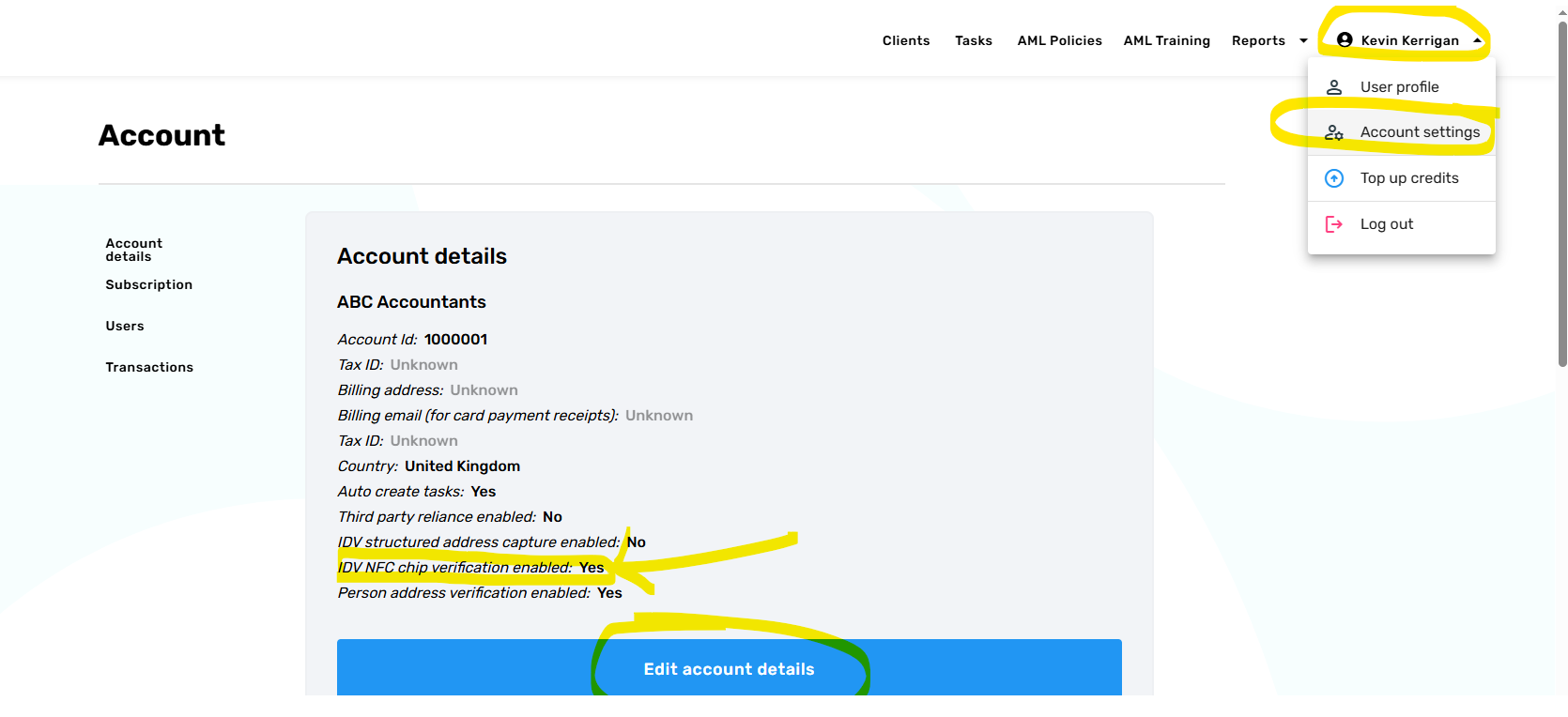
If you want to use this new feature you will need to enable it via your AML HQ account settings. If you are an administrator on your account then you can access account settings by clicking your name in the top right hand corner of your screen. Please see the below image for guidance on the IDV NFC chip verification session setting that needs to be enabled.
NOTE: This programme of work is a significant undertaking by Companies House. They estimate that over 6.5M individuals will be verified over the next year. The process of verifying clients and linking them is going to be challenging for you and your clients. There are still tweaks and changes happening in Companies House with this process and we still have a number of open clarifications left unanswered that may impact how you interact with Companies House and how we support you. We have invested a significant amount of resource to date to meet these requirements and are committed to support our clients with these new legal requirements; therefore, please contact us with suggestions if we can provide additional features or make changes that will help you further.
Ehancements to Advanced ID Verification
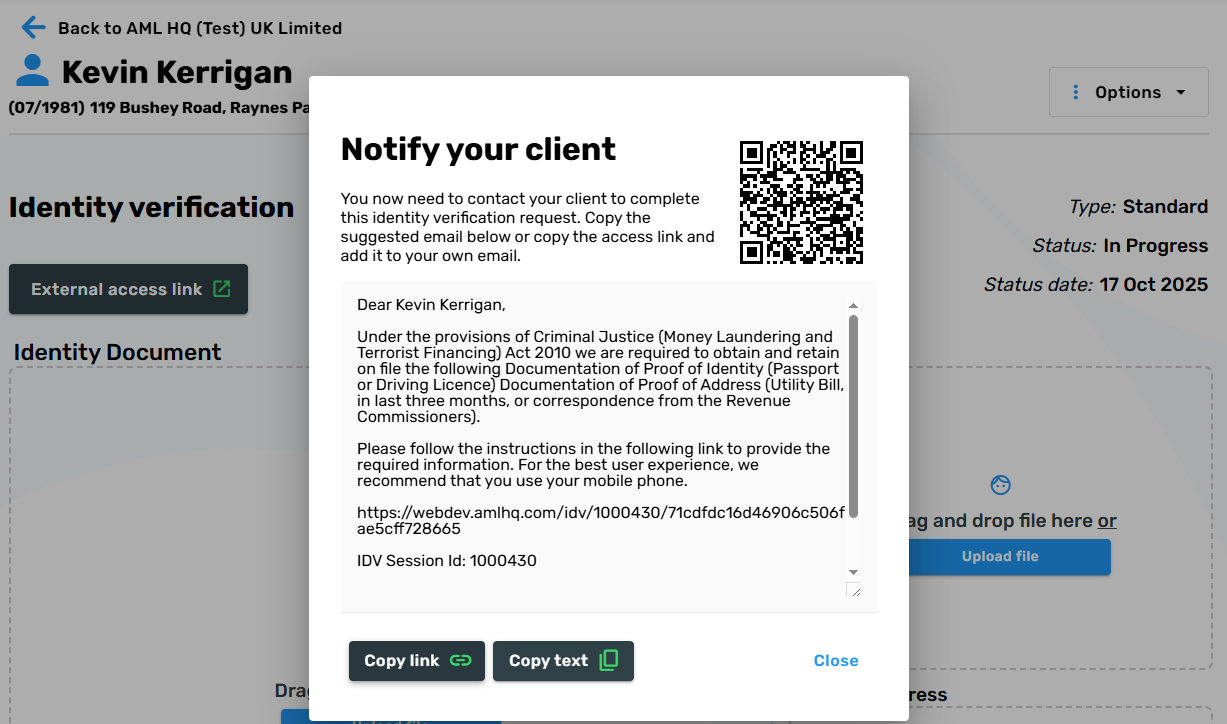
- We have added a QR code on the create ID Verification screen which will allow you to instantly access the ID Verification session. This is a handy feature if your client is present in your office and you want to help them complete the process on your device (this also works for the new Companies House process).
- If you delete or cancel an advanced ID Verification session when the session status is in progress then the credits will now be returned to your account.
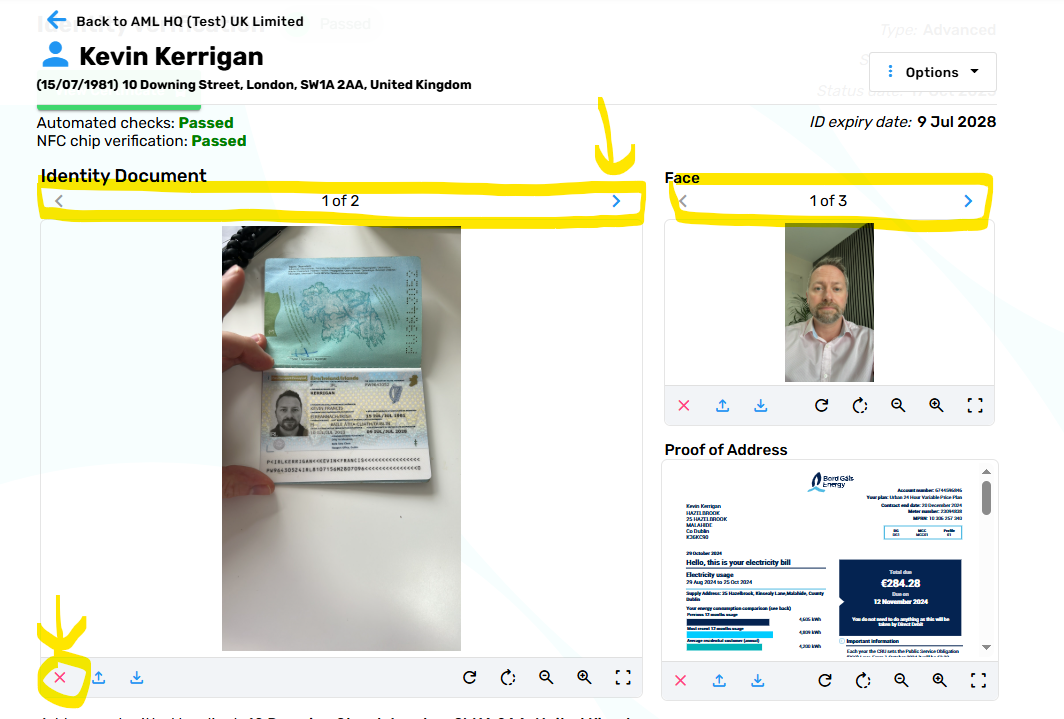
- When an ID Verification session is complete, the screens and certificates will now include all images that have been provided during the session. If you want to discard any of the images you can delete them from within the screen. This has been updated so that you have visibilty over all documents/images provided by the client. At least 2 identity document images and 2 selfie images are returned.
- We have added the ability to cancel revoke external access for an ID Verification Session that is in progress. For example, you might have received an IDV response from a client and have reopened it to allow the user to change their proof of address evidence. If you change your mind you can now revoke the external access.
- We are now displaying the Client Name on the IDV Linked Client Parties table to provide clarity on where Identity Verirication Sessions are linked
New Client Risk Assessment template
We have introduced a new and improved Client Risk Assessment template. The enhancements to the new template are based on:
- Client feedback
- Observations from Client AML reviews/inspections
- Introduction of codified / prescribed answers to support better reporting across your client base.
- Improved inline guidance to your team
When you create a new Client Risk Assessment, you will notice the new Client Risk Assessment as an alternative option to the current Standard Client Risk Assessment. In the coming months, the new Client Risk Assessment will become the Standard Risk Assessment.
Please be assured that any of your existing client risk assessments will not disappear. They remain valid and will remain accessible on your AML HQ client file.
The following video introduces the new Client Risk Assessment:
AML Client Declaration
We have added a new AML Client Declaration feature that allows you to to send a simple questionnaire to your client to capture their specific details that will inform your Client Risk Assessment.
This is a useful way to capture answers to questions that are sometimes tricky to ask your clients when you're starting a new business relationship. The answers that they provide are automatically populated into your client risk assessment and you can further validate their answers and add additional information to make your determination regarding their overall risk rating and the appropriate due diligence level.
The following video introduces the new Client Risk Declaration process:
Miscellaneous Updates
The following smaller miscellaneous improvements have also been added as part of this update:
- Drag and drop functionality added to the Add Assessment and Add Note screens within the Client Details page.
- Delete client will now automatically unlink child clients rather than blocking the delete process.
- It is now possible to cancel external risk assessment access (if it has been granted or reopened).
- The create client from client party feature now populates the jurisdiction field.